
Free Browser-Based Halftone Wall Poster Generator
Rasterbator Online: Free Halftone Poster & Tiled PDF Maker
Make a Rasterbator poster online from any photo. Generate high-resolution tiled PDFs formatted for standard A4 or US Letter desktop printers with 100% private in-browser processing.
Popular Rasterbator Poster Creation Workflows
Choose the fastest workflow in Rasterbator online: compile tiled PDFs across multiple sheets, explore pre-calculated styles, or review paper assembly specifications.
Multi-Page Poster Maker
Split photos across multiple A4 or US Letter sheets without halftone rasterization for pure graphic enlargements.
Open poster maker →Printing & Assembly Guide
Print at exact 100% scale, cut margin borders along crop marks, and align panels seamlessly on your wall.
Read assembly guide →The Rasterbator Software Guide
Looking for the classic 2000s desktop app? Discover how this modern web tool replicates the original dot algorithm.
Compare desktop vs web →Wall Art Generator
Calculate ideal wall coverage using the two-thirds furniture rule and generate custom gallery murals.
Calculate room size →Poster Gallery
Browse real-world examples with tested dot pitch settings for portraits, street art, landscapes, and anime.
View examples →Poster Templates
Start immediately with optimized presets for retro pop art, minimalist portraits, and giant room murals.
Browse presets →Engineered for High-Precision Multi-Sheet Printing
Rasterbator transforms digital pictures into monumental wall murals using physical halftone dot geometry. Everything is calculated dynamically in your web browser.
🔒 Private Browser RAM Execution
Your privacy is absolute. All image scaling, halftone rasterization, vector grid tiling, and PDF compilation are executed directly within your browser's local memory (RAM). Your photos are never uploaded or stored on any remote server.
Optical Halftone Synthesis
Converts photographic continuous gradients into calibrated dot matrices. Up close, viewers appreciate tactile graphic dots; from a distance, optical blending creates photorealistic murals.
True Aspect Ratio Preservation
Input your desired horizontal sheet count and our layout engine automatically determines exact vertical proportions, ensuring zero image distortion or uneven stretching.
Custom Dot Geometry & Palettes
Adjust dot pitch, dot diameter, and color modes (Monochrome, Black & White, or CMYK Full Color) to fine-tune your wall art for specific lighting and room aesthetics.
Direct Vector PDF Compilation
Renders dot matrices as crisp vector geometry inside printable PDF documents. Dots print with razor-sharp edges regardless of how large you expand the physical mural.
Precision Alignment Crop Marks
Every single page features fine corner crop marks and grid coordinate labels (e.g., Row 2, Column 3) to make trimming margins and hanging completely foolproof.
Unrestricted & Watermark-Free
Enjoy completely free tiled poster generation. No paywalls, no forced subscriptions, and zero advertising overlays or watermarks on your final printable PDFs.
Tested Halftone Dot Styles & Grid Formats
Review real-world configurations across popular categories to select optimal dot pitch and sheet counts before printing.


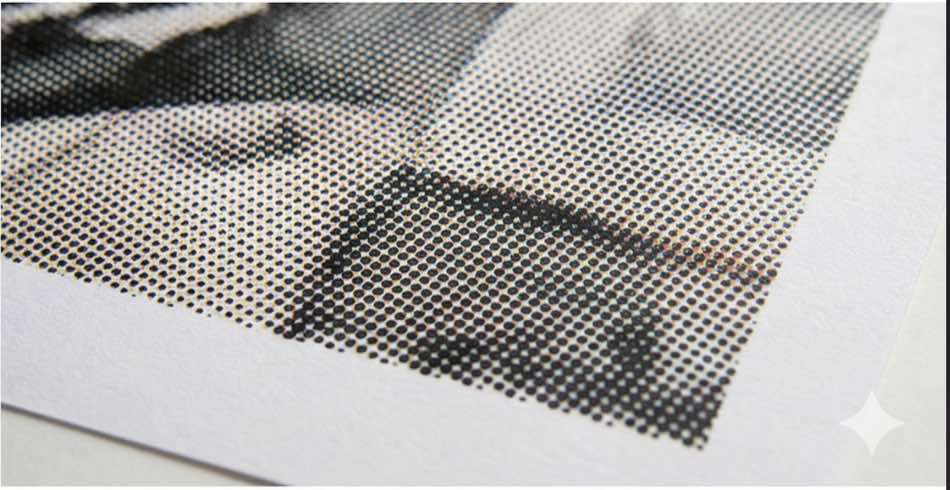
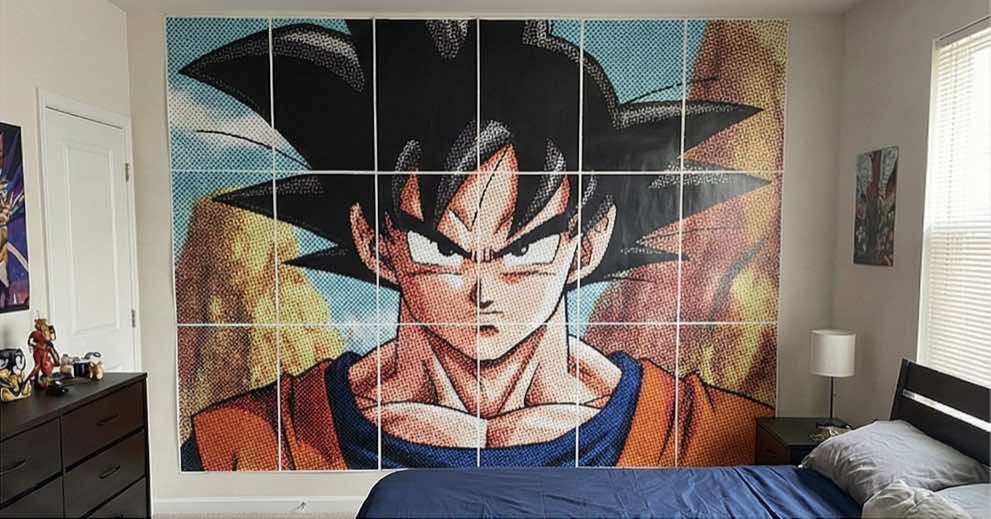
The Science of Halftone Printing: Dot Pitch vs. Viewing Distance
Halftone printing relies on human optical synthesis. When an observer stands near a tiled poster, the human eye distinguishes individual circular ink dots. As the observer steps back, the visual cortex blends the pattern into smooth tonal gradations. Matching your chosen dot pitch (the distance between dot centers) to your room's physical dimensions is critical for achieving professional results:
Fine Pitch (3 mm – 5 mm)
Viewing Distance: 1.0 m – 2.0 m
Ideal Use Cases: Hallways, study desks, intimate bedrooms, and tight gallery spaces where visitors can walk close to the art.
Standard Pitch (6 mm – 10 mm)
Viewing Distance: 2.5 m – 4.5 m
Ideal Use Cases: Living rooms above sofas, dining rooms, classroom presentations, and conference focus walls.
Pop-Art Pitch (12 mm – 20 mm)
Viewing Distance: 5.0 m+
Ideal Use Cases: High-ceiling lofts, retail window displays, exhibition stages, and bold retro Roy Lichtenstein style backdrops.
Step-by-Step: How to Print Poster at Home with Rasterbator Online
When you want to print poster at home across multiple A4 or Letter sheets, Rasterbator handles all grid divisions and vector rasterization automatically. Follow this tested four-step production workflow to print poster at home with flawless alignment:
1. Upload and Crop Your High-Contrast Source Image
Drag and drop a JPG or PNG into Rasterbator. While vector dot rendering enables low-resolution files to scale without blocky pixelation, starting with clean, high-contrast imagery produces the most striking dot definitions. Portraits with dramatic lighting and bold graphic illustrations yield maximum impact.
2. Define Paper Dimensions and Target Wall Coverage
Select your printer's native paper standard—A4 (210 × 297 mm) or US Letter (215.9 × 279.4 mm). Specify the horizontal width in pages. For a standard 2-meter wall above a sofa, a grid of 5 to 6 sheets wide usually provides the golden two-thirds aesthetic balance.
3. Customize Halftone Rasterization and Enable Crop Marks
Choose between classic monochrome black dots, dual-tone pop-art colors, or full-spectrum CMYK rendering. Ensure the Crop Marks and Page Indexing toggles remain checked so that every exported sheet contains millimeter-precise alignment boundaries.
4. The Golden Rule of Tiled Printing: Zero Scaling (100% Actual Size)
⚠️ Critical Printing Rule: Never Use "Fit to Printable Area"
Most home printer software defaults to "Fit to Paper" or "Shrink to Printable Area", which arbitrarily shrinks each page by 3% to 7% depending on hardware unprintable margins. This destroys multi-sheet alignment. In your printer dialog, select Actual Size or set Custom Scale to strictly 100%.
Paper Format Physical Reference for Home Printers
Desktop printers vary across geographic regions. Use this reference when planning the total footprint of your tiled mural:
ISO A4 Standard
Dimensions: 210 × 297 mm (8.27 × 11.69 inches)
Standard Region: Europe, UK, Latin America, Asia, Australia, Worldwide.
4x4 Grid Size: 840 × 1188 mm (~0.84 × 1.19 meters)
ANSI US Letter Standard
Dimensions: 215.9 × 279.4 mm (8.5 × 11.0 inches)
Standard Region: United States, Canada, Mexico.
4x4 Grid Size: 863.6 × 1117.6 mm (34 × 44 inches)
ISO A3 / Ledger Formats
Dimensions: 297 × 420 mm / 11 × 17 inches
Standard Region: Commercial offices and wide-format multifunction printers.
4x4 Grid Size: 1188 × 1680 mm (~1.19 × 1.68 meters)
Troubleshooting Common Multi-Sheet Assembly Issues
If you encounter issues during assembly, consult these verified solutions:
- Sheets Don't Overlap Evenly: Desktop printers feed paper with slight mechanical skew (+/- 0.5 mm). Always trim the left and top white margins using a steel ruler and utility knife, while leaving the right and bottom tabs intact to serve as glue/tape underlays.
- Excess Ink Curling Thin Paper: Printing high-density dark halftones on standard 75–80 gsm copy paper can cause waviness. Opt for 90–120 gsm premium bright white matte paper, which absorbs ink crisply without buckling.
- Wall Adhesion Without Wall Damage: Avoid aggressive double-sided foam tapes. Use painter's blue tape or removable poster putty. Pre-tape the rear seams of all sheets on a flat floor or table before lifting the completed mural onto the wall.